Best Smart Home Hubs for Device Control and Automation
Affiliate Disclosure: HomeGear Guide is reader-supported. When you buy through links on our site, we may earn an affiliate commission at no extra cost to you. We do not accept paid product placements or sponsor-biased reviews.
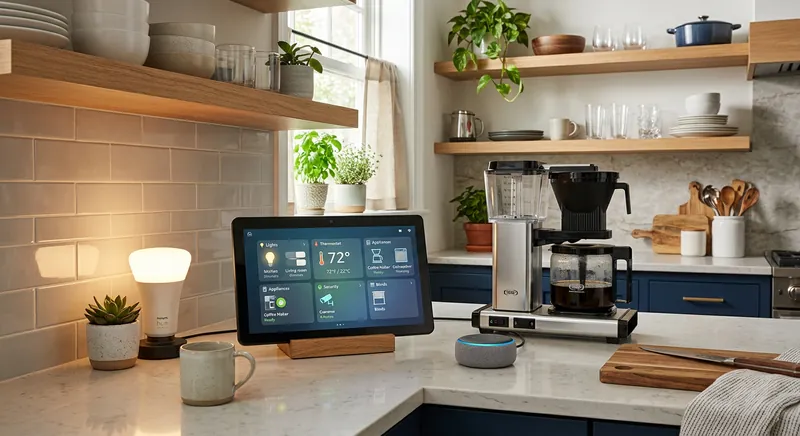
A smart home hub is the central device that connects and controls your smart home devices — locks, lights, thermostats, sensors, and cameras — through a single app or interface. Without a hub, each device lives in its own app, and automations that involve multiple devices from different brands are difficult or impossible. A hub ties them together, enabling automations like "lock the doors, turn off the lights, and lower the thermostat when everyone leaves." The hub landscape has evolved significantly with the arrival of Matter and Thread — newer standards designed to make devices work across platforms — but the core questions remain the same: which protocols does the hub support, which voice assistant does it work with, can it process automations locally, and is it the right center for the specific devices you own or plan to buy.
Quick Answer
For most homeowners starting or expanding a smart home, a hub that supports Matter, Wi-Fi, and Zigbee or Z-Wave is the best choice because it ensures compatibility with the widest range of current and future devices across multiple brands. Matter is the new universal standard backed by all major tech companies, and hubs supporting it are the most future-proof investment. Local processing capability is worth paying for because automations continue to work even if your internet connection drops. The main trade-off is versatility versus simplicity, as multi-protocol hubs support more devices but require more configuration. Voice assistant compatibility with Alexa, Google Assistant, or HomeKit should match your preferred ecosystem. Thread border router support improves response times and mesh network range for Thread-enabled devices. Budget hubs like the 3rd-generation Amazon Echo or Google Nest Hub can serve as entry-level centers.
Top Picks at a Glance
Matter-Compatible Smart Hub
Z-Wave Smart Home Hub
Voice Assistant Smart Display
Budget Smart Hub
Product Comparison
| Product | Best For | Protocols | Voice Assistant | Processing | Automation | Price Range | Details |
|---|---|---|---|---|---|---|---|
Matter-Compatible Smart Hub Best Overall | Cross-platform compatibility with modern devices | Matter, Thread, Wi-Fi, (often Zigbee) | Works with Alexa, Google, and Apple Home | Local and cloud (varies by automation) | App-based rules, schedules, and scenes | $100–$180 | View Review ↓ |
Z-Wave Smart Home Hub Best for Z-Wave | Homes with Z-Wave devices and reliable mesh networking | Z-Wave (primary); some models add Wi-Fi or Zigbee | Varies by platform — check compatibility | Local or cloud depending on hub and automation | App-based rules, schedules, scenes, and custom routines | $70–$150 | View Review ↓ |
Voice Assistant Smart Display Best with Screen | Visual control and voice interaction with a screen | Wi-Fi; some models add Zigbee, Thread, or Matter | Built-in (Alexa or Google Assistant) | Cloud-based for most automations | Voice commands, app routines, and schedules | $80–$200 | View Review ↓ |
Budget Smart Hub Best Value | Basic device control and automation at a low cost | Wi-Fi and/or Zigbee (varies by model) | Typically one platform (Alexa or Google) | Cloud-based | Basic schedules and simple rules | $30–$60 | View Review ↓ |
Matter-Compatible Smart Hub
Best Overall- Best For:
- Cross-platform compatibility with modern devices
- Protocols:
- Matter, Thread, Wi-Fi, (often Zigbee)
- Voice Assistant:
- Works with Alexa, Google, and Apple Home
- Processing:
- Local and cloud (varies by automation)
- Automation:
- App-based rules, schedules, and scenes
- Price Range:
- $100–$180
Z-Wave Smart Home Hub
Best for Z-Wave- Best For:
- Homes with Z-Wave devices and reliable mesh networking
- Protocols:
- Z-Wave (primary); some models add Wi-Fi or Zigbee
- Voice Assistant:
- Varies by platform — check compatibility
- Processing:
- Local or cloud depending on hub and automation
- Automation:
- App-based rules, schedules, scenes, and custom routines
- Price Range:
- $70–$150
Voice Assistant Smart Display
Best with Screen- Best For:
- Visual control and voice interaction with a screen
- Protocols:
- Wi-Fi; some models add Zigbee, Thread, or Matter
- Voice Assistant:
- Built-in (Alexa or Google Assistant)
- Processing:
- Cloud-based for most automations
- Automation:
- Voice commands, app routines, and schedules
- Price Range:
- $80–$200
Budget Smart Hub
Best Value- Best For:
- Basic device control and automation at a low cost
- Protocols:
- Wi-Fi and/or Zigbee (varies by model)
- Voice Assistant:
- Typically one platform (Alexa or Google)
- Processing:
- Cloud-based
- Automation:
- Basic schedules and simple rules
- Price Range:
- $30–$60
Detailed Product Reviews & Specifications
Matter-Compatible Smart Hub
A smart home hub that supports Matter, Thread, and common wireless protocols. Matter is a cross-platform standard that lets devices from different brands work together regardless of the ecosystem they were built for. Thread provides a low-power, self-healing mesh network for connected devices.
Pros
- •Matter support enables cross-platform device compatibility
- •Thread border router for low-power, reliable mesh networking
- •Also supports Wi-Fi and often Zigbee for older devices
- •Works with major voice assistants and smart home platforms
Cons
- •Matter ecosystem is still growing — not all devices support it yet
- •Thread network requires Thread-enabled devices to benefit
- •Higher price than basic hubs
Key Specifications
Z-Wave Smart Home Hub
A hub focused on Z-Wave protocol support, providing a reliable mesh network for Z-Wave locks, sensors, lights, and thermostats. Z-Wave operates on a dedicated frequency that avoids Wi-Fi congestion and creates a self-healing mesh where each device extends the network's range.
Pros
- •Dedicated Z-Wave mesh network is reliable and avoids Wi-Fi congestion
- •Each Z-Wave device extends the network range
- •Wide selection of Z-Wave devices available from many brands
- •Low-power operation preserves battery life for sensor devices
Cons
- •Limited to Z-Wave devices — does not support Zigbee or Thread natively
- •Requires a separate bridge for non-Z-Wave devices
- •Z-Wave device limit per network (typically 232 devices) may matter for very large installations
Key Specifications
Voice Assistant Smart Display
A smart display with a built-in screen that serves as a hub for smart home devices while also providing visual feedback, camera feeds, and touch controls. Combines voice assistant capabilities with a dashboard for viewing and managing connected devices, checking camera feeds, and controlling scenes.
Pros
- •Visual dashboard shows device status and camera feeds at a glance
- •Touch screen for quick control without needing your phone
- •Voice control built in — no separate speaker needed
- •Supports video calling, calendars, and media in addition to smart home control
Cons
- •Screen is a point of failure — display issues disable touch control
- •Requires a power outlet — not portable like some puck hubs
- •Smart home protocol support varies — some support Zigbee or Matter, others are Wi-Fi only
Key Specifications
Budget Smart Hub
An affordable smart home hub that provides basic device control, scheduling, and simple automations. Typically supports one or two wireless protocols and works with a major voice assistant. Covers the essentials for homeowners who want centralized control without a premium price.
Pros
- •Lowest cost among smart home hubs
- •Basic scheduling and automation support
- •Works with a major voice assistant
- •Simple setup for small device ecosystems
Cons
- •Limited protocol support — may cover only Wi-Fi or Zigbee
- •Fewer automation options than premium hubs
- •May rely entirely on cloud processing — no local control
Key Specifications
Protocol Support: Zigbee, Z-Wave, Matter, and Thread
Smart home devices communicate using different wireless protocols, and your hub must support the protocols your devices use. The four most relevant protocols are Zigbee, Z-Wave, Matter, and Thread. A hub that supports more protocols can control a wider range of devices.
Zigbee is a low-power mesh protocol used by many smart bulbs, sensors, and locks. Z-Wave is similar but operates on a different frequency and is common in smart locks, thermostats, and sensors from brands focused on home security and automation. Zigbee and Z-Wave are not interchangeable — a Zigbee hub cannot control Z-Wave devices and vice versa.
Matter is a newer cross-platform standard designed to solve the fragmentation problem. A Matter-certified device works with any Matter-compatible hub, regardless of the manufacturer. Thread is a low-power mesh networking protocol that Matter uses as one of its transport layers. Together, Matter and Thread aim to make smart home devices as interoperable as Wi-Fi devices. If you are buying a hub today, Matter support is a strong future-proofing feature, even though the ecosystem is still growing.
Do You Need a Hub at All?
Some smart home devices connect directly to Wi-Fi and do not require a hub — each device communicates with the cloud independently, and you control them through their own apps or a platform like Alexa or Google Home. A hub becomes valuable when you want devices from different brands to interact, when you want automations that trigger multiple devices, or when you use Zigbee or Z-Wave devices that need a hub to communicate. If you have only a few Wi-Fi devices from one brand, you may not need a separate hub.
Voice Assistant Integration
Most smart home hubs work with at least one voice assistant — Amazon Alexa, Google Assistant, or Apple Siri. Voice integration lets you control devices and trigger scenes by speaking, which is convenient for tasks like turning off all lights or locking all doors as you head to bed.
When choosing a hub, consider which voice assistant you already use. If you have Amazon Echo devices throughout your home, a hub that integrates with Alexa provides the most seamless experience. If you use Google Home or Apple HomeKit, choose accordingly. Some hubs support multiple assistants, giving you flexibility.
Voice control is convenient, but it is not a replacement for app-based control and automations. Voice commands are best for on-demand actions, while scheduled automations and sensor-triggered routines run automatically without any voice input. A good hub supports both.
Automation Capabilities
The primary reason to buy a hub is automation — programming devices to respond to triggers without manual input. A simple automation might be "turn on the porch light at sunset." A more complex one might be "when the front door unlocks after 6 PM, turn on the entry light, set the thermostat to 72, and start playing music."
Most hubs support basic automations: schedules (turn on/off at specific times), device triggers (when motion is detected, turn on a light), and scenes (set multiple devices to predefined states at once). More advanced hubs support conditional logic (if this, then that), variable states, and multi-step routines that chain several actions together.
When comparing hubs, think about the automations you want to create. If you only need simple schedules and scenes, a budget hub or voice assistant display may suffice. If you want complex conditional routines involving many devices, look for a hub with robust automation capabilities and local processing so your routines keep running even without internet.
Local vs Cloud Processing
Smart home hubs process automations either locally (on the hub itself) or in the cloud (on remote servers). Local processing means your automations run instantly and continue to work even if your internet connection goes down. Cloud processing depends on an internet connection — if your internet is down, cloud-based automations stop working.
Local processing is more reliable and faster, with no dependency on an internet connection or a manufacturer's cloud service. It also reduces privacy concerns since your data stays in your home. However, local processing hubs may have fewer integrations and may not support voice assistants that require cloud connectivity.
Cloud processing offers broader compatibility and easier setup, since the manufacturer's servers handle the heavy lifting. But it introduces a dependency on both your internet connection and the manufacturer's service — if the company discontinues the product or shuts down its cloud, your hub may stop working. For critical automations like security-related routines, local processing is preferable.
Frequently Asked Questions
You need a hub if you want devices from different brands to interact, if you use Zigbee or Z-Wave devices (which require a hub to communicate), or if you want complex automations involving multiple devices. If you have only a few Wi-Fi devices from one brand, you may not need a separate hub — your voice assistant or the devices' own apps may be sufficient.
Final Verdict
For most homeowners starting or growing a smart home, a Matter-compatible smart hub is the best choice — it supports the latest cross-platform standard while also handling Zigbee and Wi-Fi devices, making it the most future-proof option. If you have a significant investment in Z-Wave devices, a Z-Wave-focused hub provides the most reliable mesh network for those devices. A voice assistant smart display is ideal if you want a central touchscreen for managing devices, viewing cameras, and using voice commands. Budget hubs cover basic control and scheduling for small device ecosystems but may lack local processing and broad protocol support. Whatever you choose, verify protocol compatibility with your devices, prefer local processing for critical automations, and choose a hub that works with the voice assistant you already use.
Emily Ross
Smart Home & Energy Writer
Emily researches smart home technology, home energy systems, and backup power solutions for HomeGear Guide. Her work focuses on helping homeowners understand how connected devices and energy products compare and what to look for before investing.
Related Articles & Buying Guides
 Smart Home
Best Smart Thermostats for Energy Savings and Comfort
Compare learning and programmable smart thermostats with remote sensors. Understand C-wire requirements, HVAC compatibility, and which features actually save energy.
 Smart Home
Best Smart Locks for Keyless Home Entry
Compare Wi-Fi, Bluetooth, and Z-Wave smart locks with keypads and fingerprint readers. Understand deadbolt grades, battery life, and keyless entry options.
 Smart Home
Best Video Doorbells for Home Security and Package Protection
Compare wired and battery-powered video doorbells. Understand resolution, field of view, storage fees, smart alerts, and which power source fits your home.
 Smart Home
Best Smart Smoke Detectors for Early Warning and Alerts
Compare hardwired, battery, and voice-alert smart smoke detectors. Understand ionization vs photoelectric sensors, CO detection, wireless interconnectivity, and app alerts.
Get Smarter About Your Home
Receive practical buying guides, product comparisons, maintenance tips and home project ideas from HomeGear Guide.
You can unsubscribe at any time.