Best Smart Thermostats for Energy Savings and Comfort
Affiliate Disclosure: HomeGear Guide is reader-supported. When you buy through links on our site, we may earn an affiliate commission at no extra cost to you. We do not accept paid product placements or sponsor-biased reviews.
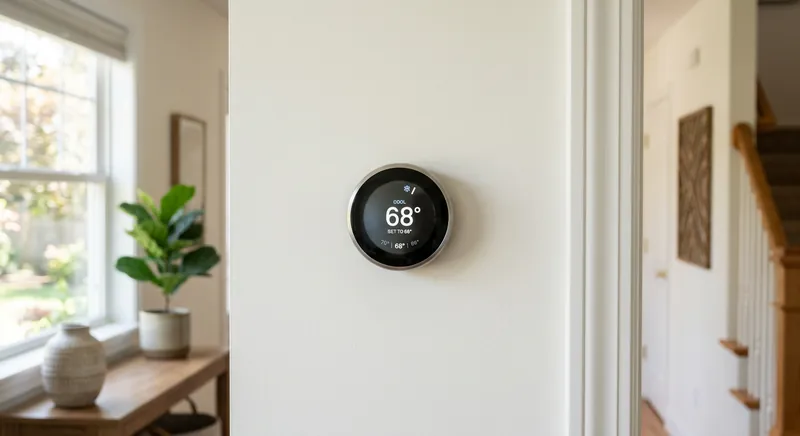
A smart thermostat is one of the few smart home devices that can pay for itself over time. By adjusting temperatures based on your schedule, occupancy, and even local weather, a good smart thermostat can reduce heating and cooling waste without requiring you to remember to turn the dial down before leaving the house. But not every smart thermostat works with every HVAC system, and the most expensive model is not always the best choice for your home. The C-wire question alone trips up many buyers — some thermostats require it, some include a workaround, and some will not work at all without it. Understanding the basics before you buy helps you avoid a return trip to the store and an installation headache.
Quick Answer
For most homeowners, a mid-priced smart thermostat in the 100 to 200 dollar range with built-in C-wire adapter, remote sensor support, and Wi-Fi connectivity is the best choice because it delivers 10 to 15 percent energy savings through schedule learning and occupancy sensing without the premium cost of top-tier models. The C-wire is the most critical compatibility question, as many older homes lack this dedicated 24V power wire, and some thermostats include an adapter while others require one to be run. Remote sensors are worth paying for if you have multi-story homes or rooms that run hotter or colder than the main thermostat location. The main trade-off is smart features versus simplicity, as learning thermostats adapt automatically but are harder to override manually. Geofencing that detects when you leave and return can save an additional 5 to 10 percent on energy.
Top Picks at a Glance
Learning Thermostat
Programmable Smart Thermostat
Budget Smart Thermostat
Thermostat with Remote Sensor
Product Comparison
| Product | Best For | Type | C-Wire Required | Remote Sensors | Price Range | Details |
|---|---|---|---|---|---|---|
Learning Thermostat Best Overall | Hands-off scheduling and energy savings | Learning | Yes (or included power accessory) | Included; additional sensors sold separately | $200–$250 | View Review ↓ |
Programmable Smart Thermostat Best Value | Reliable scheduling at a moderate price | Programmable | Yes | Not included; limited or no support | $100–$150 | View Review ↓ |
Budget Smart Thermostat Best Budget | Basic remote control at the lowest price | Programmable (basic) | Varies — some models include a power-sharing option | Not supported | $60–$90 | View Review ↓ |
Thermostat with Remote Sensor Best for Multi-Zone | Multi-zone homes and rooms with temperature variance | Programmable with sensor support | Yes | 1–2 included; expandable | $150–$200 | View Review ↓ |
Learning Thermostat
Best Overall- Best For:
- Hands-off scheduling and energy savings
- Type:
- Learning
- C-Wire Required:
- Yes (or included power accessory)
- Remote Sensors:
- Included; additional sensors sold separately
- Price Range:
- $200–$250
Programmable Smart Thermostat
Best Value- Best For:
- Reliable scheduling at a moderate price
- Type:
- Programmable
- C-Wire Required:
- Yes
- Remote Sensors:
- Not included; limited or no support
- Price Range:
- $100–$150
Budget Smart Thermostat
Best Budget- Best For:
- Basic remote control at the lowest price
- Type:
- Programmable (basic)
- C-Wire Required:
- Varies — some models include a power-sharing option
- Remote Sensors:
- Not supported
- Price Range:
- $60–$90
Thermostat with Remote Sensor
Best for Multi-Zone- Best For:
- Multi-zone homes and rooms with temperature variance
- Type:
- Programmable with sensor support
- C-Wire Required:
- Yes
- Remote Sensors:
- 1–2 included; expandable
- Price Range:
- $150–$200
Detailed Product Reviews & Specifications
Learning Thermostat
A learning thermostat that builds a schedule automatically by observing your temperature adjustments over the first few weeks. No manual programming required — the thermostat figures out your routine and adjusts accordingly, then refines its schedule over time.
Pros
- •Builds a schedule automatically without manual programming
- •Remote sensors help manage temperature in occupied rooms
- •Turns itself down when it detects no one is home
- •Clean design with a rotating ring interface
Cons
- •Higher price than programmable alternatives
- •Learning period takes a week or more to establish a reliable schedule
- •Requires a C-wire or power accessory for most installations
Key Specifications
Programmable Smart Thermostat
A programmable smart thermostat that lets you set a custom 7-day schedule from an app or the device itself. Does not learn automatically but offers flexible scheduling, remote control, and energy reports at a lower price than learning models.
Pros
- •Flexible 7-day programming with multiple periods per day
- •Lower cost than learning thermostats
- •App-based remote control and energy usage reports
- •Compatible with most 24V HVAC systems
Cons
- •Requires manual schedule setup — no automatic learning
- •Fewer premium features than learning models
- •C-wire required for reliable power
Key Specifications
Budget Smart Thermostat
An entry-level smart thermostat that provides app-based remote control and basic scheduling at a budget-friendly price. Lacks learning capabilities and remote sensor support but covers the essentials for homeowners who want to adjust temperature from their phone.
Pros
- •Lowest price among smart thermostats
- •Simple app-based control from anywhere
- •Straightforward installation for compatible systems
- •Basic scheduling for weekdays and weekends
Cons
- •No learning or occupancy detection
- •No remote sensor support
- •Limited scheduling flexibility compared to mid-range models
Key Specifications
Thermostat with Remote Sensor
A smart thermostat that includes one or more remote room sensors, allowing it to read and manage temperature in specific rooms rather than only at the thermostat's wall location. Ideal for homes where the thermostat is in a hallway but comfort matters in bedrooms or living areas.
Pros
- •Remote sensors prioritize occupied rooms for temperature control
- •Helps balance temperatures across multi-story homes
- •Can follow a schedule that targets different rooms at different times
- •Additional sensors can be added for larger homes
Cons
- •More expensive than single-location thermostats
- •Sensors require batteries and placement planning
- •Does not create independent zones — it manages one HVAC system based on sensor input
Key Specifications
The C-Wire Question: Why It Matters
The common wire, or C-wire, provides a continuous 24-volt power connection from your HVAC system to your thermostat. Most smart thermostats need this constant power to keep their Wi-Fi connection, display, and internal electronics running. Without a C-wire, a smart thermostat may work intermittently, lose Wi-Fi connection, or fail to power on at all.
If your home does not have a C-wire, you have a few options. Some thermostats include a power accessory — often called a power extender kit — that can serve as a substitute. In other cases, an unused wire in your existing thermostat cable can be repurposed as a C-wire. If neither option works, running a new wire or installing a wall adapter may be necessary, which can require professional help.
Before buying any smart thermostat, check your current wiring. Remove your existing thermostat faceplate and photograph the wires. If you see a wire connected to the C terminal, you have a C-wire. If you do not, verify whether the thermostat you want includes a power accessory or alternative solution.
Learning vs Programmable Thermostats
Smart thermostats fall into two broad categories: learning and programmable. A learning thermostat observes your manual adjustments over the first week or two of use and builds a schedule automatically. You do not need to program it — it figures out when you leave, when you return, and what temperatures you prefer at different times.
A programmable thermostat requires you to set a schedule manually, usually through an app or on the device itself. You define the temperatures and times for each day. This gives you full control but requires more setup effort and will not adapt if your routine changes unless you update the schedule.
Learning thermostats cost more but are ideal for households with variable schedules or for anyone who does not want to think about programming. Programmable models are a better value for households with consistent routines where a set schedule works reliably. Both types provide remote control via app and energy usage reporting.
Which Approach Saves More Energy?
Energy savings depend more on how consistently the thermostat avoids heating or cooling an empty house than on whether it learns or is programmed. A well-set programmable schedule can save just as much as a learning thermostat. The advantage of a learning model is that it adapts automatically, which helps if your schedule changes frequently or you tend to forget to adjust the thermostat manually.
HVAC Compatibility: Check Before You Buy
Not every smart thermostat works with every HVAC system. Most are designed for standard 24-volt low-voltage systems, which are common in homes with central heating and cooling. If you have a high-voltage system — common in older homes with electric baseboard heat or line-voltage thermostats — most smart thermostats will not work, and you need a model specifically rated for line-voltage systems.
Heat pumps, multi-stage systems, and dual-fuel systems are generally supported by mid-range and premium thermostats, but compatibility varies by model. Most manufacturers offer an online compatibility checker where you enter your system type or wiring configuration. Use it before purchasing to avoid a model that will not control your equipment.
If you are unsure about your system type, look at your existing thermostat's wiring labels or consult an HVAC professional. Installing a thermostat on an incompatible system can damage the thermostat or the HVAC equipment.
Remote Sensors and Multi-Room Comfort
A thermostat mounted in a hallway reads the hallway temperature, not the temperature in the living room or bedroom where you actually spend your time. Remote sensors solve this problem by placing temperature sensors in the rooms that matter. The thermostat can then average readings across sensors or prioritize the sensor in the room that is currently occupied.
For multi-story homes, remote sensors are particularly valuable. Heat rises, so upper floors often run warmer than lower ones. A thermostat with remote sensors can prioritize the downstairs sensor during the day and the upstairs bedroom sensor at night, creating more even comfort without a zoned HVAC system.
Keep in mind that remote sensors do not create independent zones. Your HVAC system still turns on as a single unit — the sensors just help the thermostat decide when and how long to run based on the room you care about most. True independent zone control requires zoning dampers or multiple HVAC systems.
Frequently Asked Questions
Most smart thermostats require a C-wire (common wire) for reliable power. Without it, the thermostat may lose Wi-Fi connectivity or fail to function properly. Some models include a power extender kit or power-sharing option as an alternative. Check your existing wiring before purchasing and use the manufacturer's compatibility tool.
Final Verdict
For most homeowners, a learning thermostat offers the best blend of convenience and energy savings — it builds a schedule automatically and adapts to changes in your routine without manual programming. If you prefer full control and want to spend less, a programmable smart thermostat delivers app control and reliable scheduling at a lower price. For multi-story homes with temperature imbalances, a thermostat with remote sensors makes a meaningful comfort difference by prioritizing the room you are actually in. Budget models cover the basics of remote control but skip the features that drive the most savings. Whichever you choose, verify HVAC compatibility and C-wire availability before buying.
Emily Ross
Smart Home & Energy Writer
Emily researches smart home technology, home energy systems, and backup power solutions for HomeGear Guide. Her work focuses on helping homeowners understand how connected devices and energy products compare and what to look for before investing.
Related Articles & Buying Guides
 Smart Home
Best Video Doorbells for Home Security and Package Protection
Compare wired and battery-powered video doorbells. Understand resolution, field of view, storage fees, smart alerts, and which power source fits your home.
 Smart Home
Best Outdoor Security Cameras for Home Monitoring
Compare wire-free, wired PoE, floodlight, and budget outdoor cameras. Understand resolution, night vision, power source, storage options, and IP weather ratings.
 Smart Home
Best Smart Home Hubs for Device Control and Automation
Compare Matter-compatible, Z-Wave, voice assistant, and budget smart home hubs. Understand protocol support, voice integration, automation, and local vs cloud processing.
 Smart Home
Best Smart Locks for Keyless Home Entry
Compare Wi-Fi, Bluetooth, and Z-Wave smart locks with keypads and fingerprint readers. Understand deadbolt grades, battery life, and keyless entry options.
Get Smarter About Your Home
Receive practical buying guides, product comparisons, maintenance tips and home project ideas from HomeGear Guide.
You can unsubscribe at any time.