Best Smart Locks for Keyless Home Entry
Affiliate Disclosure: HomeGear Guide is reader-supported. When you buy through links on our site, we may earn an affiliate commission at no extra cost to you. We do not accept paid product placements or sponsor-biased reviews.
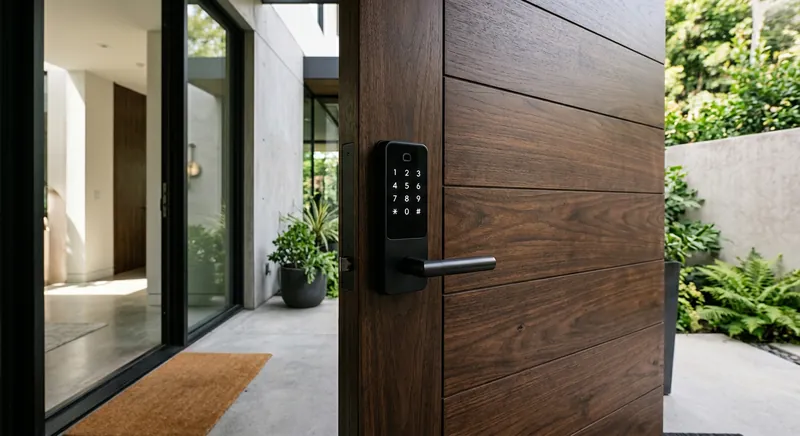
A smart lock lets you lock and unlock your door from your phone, grant temporary access to guests, and stop hiding a spare key under the mat. For families with kids who lose keys, homeowners who travel, or anyone who has ever wondered whether they remembered to lock the door, a smart lock solves a real daily problem. But a smart lock is also a security device, which means the buying decision matters more than with most smart home gadgets. The lock's physical deadbolt grade, its connectivity options, its battery life, and its keyless entry methods all affect both security and everyday convenience. Choosing wisely means understanding what each feature does and which ones match how your household actually uses the front door.
Quick Answer
For most homeowners, a smart deadbolt with a Grade 2 ANSI rating, Bluetooth and Wi-Fi connectivity, and keypad entry is the best choice because it provides reliable physical security comparable to a traditional deadbolt while enabling phone control, temporary guest codes, and remote locking without a separate hub. Grade 2 is the minimum acceptable rating for residential exterior doors, as Grade 3 locks are easier to force. Wi-Fi connectivity built into the lock is preferable to Bluetooth-only models because it enables remote control without needing a separate smart home hub within range. The main trade-off is battery life, as Wi-Fi drains batteries in 1 to 3 months versus 6 to 12 months for Bluetooth or Z-Wave models. Keyless entry via fingerprint or keypad is the most convenient daily feature, and a physical key override is essential for emergency access. Biometric models cost more but eliminate the need to remember codes.
Top Picks at a Glance
Wi-Fi Smart Lock
Smart Lock with Keypad
Bluetooth Smart Lock
Smart Deadbolt with Fingerprint
Product Comparison
| Product | Best For | Connectivity | Deadbolt Grade | Battery Life | Keyless Entry | Price Range | Details |
|---|---|---|---|---|---|---|---|
Wi-Fi Smart Lock Best Overall | Remote control and smart home integration | Wi-Fi (direct) | ANSI/BHMA Grade 2 or higher | 4–8 months (4 AA batteries typical) | App, keypad (if included), and/or physical key backup | $150–$230 | View Review ↓ |
Smart Lock with Keypad Best for Families | Families and households with multiple users | Wi-Fi, Bluetooth, or Z-Wave (varies by model) | ANSI/BHMA Grade 2 or higher | 6–12 months depending on connectivity | Keypad, app, and physical key backup | $130–$200 | View Review ↓ |
Bluetooth Smart Lock Best Budget | Basic keyless entry at a low price | Bluetooth | ANSI/BHMA Grade 2 or 3 | 8–12 months (longer than Wi-Fi models) | App and physical key backup | $80–$130 | View Review ↓ |
Smart Deadbolt with Fingerprint Best Biometric | Fast, keyless biometric entry | Wi-Fi or Bluetooth (varies by model) | ANSI/BHMA Grade 2 or higher | 6–10 months depending on usage and connectivity | Fingerprint, keypad, app, and physical key backup | $160–$250 | View Review ↓ |
Wi-Fi Smart Lock
Best Overall- Best For:
- Remote control and smart home integration
- Connectivity:
- Wi-Fi (direct)
- Deadbolt Grade:
- ANSI/BHMA Grade 2 or higher
- Battery Life:
- 4–8 months (4 AA batteries typical)
- Keyless Entry:
- App, keypad (if included), and/or physical key backup
- Price Range:
- $150–$230
Smart Lock with Keypad
Best for Families- Best For:
- Families and households with multiple users
- Connectivity:
- Wi-Fi, Bluetooth, or Z-Wave (varies by model)
- Deadbolt Grade:
- ANSI/BHMA Grade 2 or higher
- Battery Life:
- 6–12 months depending on connectivity
- Keyless Entry:
- Keypad, app, and physical key backup
- Price Range:
- $130–$200
Bluetooth Smart Lock
Best Budget- Best For:
- Basic keyless entry at a low price
- Connectivity:
- Bluetooth
- Deadbolt Grade:
- ANSI/BHMA Grade 2 or 3
- Battery Life:
- 8–12 months (longer than Wi-Fi models)
- Keyless Entry:
- App and physical key backup
- Price Range:
- $80–$130
Smart Deadbolt with Fingerprint
Best Biometric- Best For:
- Fast, keyless biometric entry
- Connectivity:
- Wi-Fi or Bluetooth (varies by model)
- Deadbolt Grade:
- ANSI/BHMA Grade 2 or higher
- Battery Life:
- 6–10 months depending on usage and connectivity
- Keyless Entry:
- Fingerprint, keypad, app, and physical key backup
- Price Range:
- $160–$250
Detailed Product Reviews & Specifications
Wi-Fi Smart Lock
A Wi-Fi-enabled smart deadbolt that connects directly to your home network without requiring a separate hub. Allows locking and unlocking from anywhere via app, guest access codes, and activity history. Includes auto-lock and tamper alerts.
Pros
- •Remote lock and unlock from anywhere via Wi-Fi
- •No separate hub required — connects directly to your router
- •Guest access with temporary or recurring codes
- •Activity log shows who locked or unlocked and when
Cons
- •Wi-Fi connectivity drains batteries faster than Bluetooth or Z-Wave
- •Requires strong Wi-Fi signal at the door for reliable operation
- •Higher price than Bluetooth-only models
Key Specifications
Smart Lock with Keypad
A smart lock with a built-in keypad that supports multiple user codes. Each family member or regular visitor gets their own code, and temporary codes can be created for guests, dog walkers, or service providers. Combines keyless convenience with app-based management.
Pros
- •Individual codes for each family member or guest
- •No phone needed to enter — just enter a code
- •Temporary codes can be scheduled and set to expire
- •Auto-lock feature engages after a set time
Cons
- •Keypad adds width to the lock — may not fit narrow door frames
- •Codes can be observed by others if not entered discreetly
- •Connectivity varies — some models require a hub for remote access
Key Specifications
Bluetooth Smart Lock
A Bluetooth-only smart lock that provides phone-based locking and unlocking when you are near the door. Does not support remote control from afar without a separate Wi-Fi bridge, but covers the basics of keyless entry and auto-lock at the lowest price point.
Pros
- •Lowest price among smart locks
- •Bluetooth connectivity is energy-efficient for longer battery life
- •Phone-based unlock when within range
- •Simple setup without hub or network configuration
Cons
- •No remote control when away from home without a separate bridge
- •Limited range — phone must be within Bluetooth distance of the door
- •Fewer features than Wi-Fi or Z-Wave models
Key Specifications
Smart Deadbolt with Fingerprint
A smart lock with a built-in fingerprint reader that unlocks in under a second when a registered finger is placed on the sensor. Supports multiple fingerprints, keypad codes, and app-based control. Eliminates the need for keys or codes for daily entry.
Pros
- •Fast biometric unlock — no key or code needed for daily use
- •Supports multiple registered fingerprints for different users
- •Keypad and app serve as backup entry methods
- •No risk of shared or copied codes
Cons
- •Fingerprint sensor can be affected by wet, cold, or dirty fingers
- •Higher price than keypad-only models
- •Sensor requires occasional cleaning for reliable reads
Key Specifications
Deadbolt Grade: Security Starts with the Bolt
A smart lock is only as secure as the deadbolt behind its electronics. The American National Standards Institute (ANSI) and Builders Hardware Manufacturers Association (BHMA) grade deadbolts on a scale from Grade 1 (highest security) to Grade 3 (residential standard). Grade 1 deadbolts are typically found in commercial settings but are increasingly available in residential smart locks for homeowners who want maximum security.
Grade 2 is the most common rating for quality residential smart locks and provides a good balance of security and cost. Grade 3 deadbolts meet basic residential standards but offer less resistance to forced entry. When comparing smart locks, check the deadbolt grade — it is a more meaningful security indicator than any smart feature.
The lock's physical installation also matters. A Grade 1 deadbolt installed with short screws into a weak door frame will not perform to its rating. Use long screws that reach into the wall stud behind the frame, and ensure the strike plate is properly secured.
Connectivity: Wi-Fi, Bluetooth, and Z-Wave
A smart lock's connectivity determines how it communicates with your phone and other devices, and each option has trade-offs in range, power consumption, and features.
Wi-Fi locks connect directly to your home router, enabling remote control from anywhere without a hub. The downside is power consumption — Wi-Fi drains batteries faster than other protocols, typically requiring replacement every 4–8 months.
Bluetooth locks communicate directly with your phone when you are nearby. They are the most energy-efficient option, with battery life often exceeding a year, but they do not support remote control unless paired with a separate Wi-Fi bridge.
Z-Wave locks connect through a Z-Wave hub, which then connects to your network. This allows remote control and integration with other Z-Wave devices while keeping battery drain low. However, you need a compatible hub, which adds cost. Z-Wave is a good choice if you are building a broader smart home system with a hub at its center.
Which Protocol Is Right for You?
If you want remote control without buying a hub, choose Wi-Fi. If you want the longest battery life and primarily use the lock when at home, Bluetooth is sufficient. If you already have or plan to build a Z-Wave smart home system with a hub, a Z-Wave lock integrates seamlessly and conserves battery. Matter support is emerging in newer locks, which may simplify cross-platform compatibility in the future.
Battery Life and Keyless Entry Methods
Smart locks run on batteries, and a dead battery means you are locked out unless you have a backup entry method. Battery life ranges from 4 months on Wi-Fi locks to over a year on Bluetooth models. Most locks send low-battery alerts through the app, but it is important to replace batteries promptly when warned.
Keyless entry methods vary by model. App-based unlock requires your phone to be connected and nearby (Bluetooth) or connected to the internet (Wi-Fi). Keypad entry works without a phone and is ideal for children, guests, and anyone who does not want to use an app. Fingerprint entry is the fastest method for daily use but requires sensor maintenance and backup methods for when the sensor cannot read your print.
A physical key backup is worth having. Even with smart features, a key provides a fail-safe entry method that works regardless of battery status, network outages, or app problems. Some smart locks replace the keyway entirely, which means you have no manual backup — consider whether that is a risk you are comfortable with.
Auto-Lock and Smart Features
Auto-lock is one of the most useful features on a smart lock. After the door is closed, the lock automatically engages the deadbolt after a set delay — typically 30 seconds to 5 minutes. This eliminates the "did I lock the door?" anxiety and is especially valuable for busy households.
Other useful features include tamper alerts, which notify you if someone is trying to force the lock; door position sensors, which tell you if the door is closed before auto-locking; and scheduling, which can automatically lock at a set time each night. Guest access codes that can be created, scheduled, and revoked from the app are valuable for anyone who has regular visitors or rental guests.
When comparing features, focus on the ones that match your routine. A lock with dozens of features you never use is not better than a simpler lock that does the few things you need reliably.
Frequently Asked Questions
Quality smart locks use deadbolts with the same ANSI/BHMA grades as traditional locks, so the physical security is comparable. The electronics add convenience features without reducing the bolt's resistance to forced entry. The main difference is the added complexity of batteries and connectivity, which can fail — so choose a model with a physical key backup or keypad for redundancy.
Final Verdict
For most homeowners, a Wi-Fi smart lock provides the best balance of remote control, guest access, and ease of installation without requiring a separate hub. Families benefit from a keypad model that gives each person their own code, eliminating the need for keys or phone apps for daily entry. Bluetooth locks are a good budget choice if you primarily need keyless entry at the door and do not require remote control. Fingerprint locks offer the fastest daily entry experience but come at a premium. Whichever you choose, prioritize a deadbolt with an ANSI/BHMA Grade 2 or higher rating, keep a backup entry method, and enable auto-lock so you never have to wonder whether the door is locked.
Emily Ross
Smart Home & Energy Writer
Emily researches smart home technology, home energy systems, and backup power solutions for HomeGear Guide. Her work focuses on helping homeowners understand how connected devices and energy products compare and what to look for before investing.
Related Articles & Buying Guides
 Smart Home
Best Video Doorbells for Home Security and Package Protection
Compare wired and battery-powered video doorbells. Understand resolution, field of view, storage fees, smart alerts, and which power source fits your home.
 Smart Home
Best Home Security Systems for DIY and Professional Monitoring
Compare DIY no-contract, professionally monitored, and self-monitored security systems. Understand sensor types, cellular backup, and smart home integration.
 Smart Home
Best Smart Home Hubs for Device Control and Automation
Compare Matter-compatible, Z-Wave, voice assistant, and budget smart home hubs. Understand protocol support, voice integration, automation, and local vs cloud processing.
 Smart Home
Best Outdoor Security Cameras for Home Monitoring
Compare wire-free, wired PoE, floodlight, and budget outdoor cameras. Understand resolution, night vision, power source, storage options, and IP weather ratings.
 Smart Home
Best Smart Garage Door Openers for Remote Access and Security
Compare belt drive, chain drive, wall-mount, and retrofit smart garage door openers. Understand HP ratings, drive types, smart features, and compatibility.
Get Smarter About Your Home
Receive practical buying guides, product comparisons, maintenance tips and home project ideas from HomeGear Guide.
You can unsubscribe at any time.